


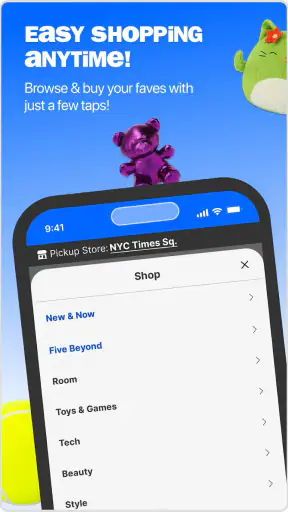
I approached Five Below: Shop Fun Finds as a practical shopping companion rather than just another store app. It is free, aimed at everyone, and comes from Five Below, Inc, the retailer behind the familiar mix of low-cost accessories, room items, toys, beauty products, tech extras, and seasonal finds. My first impression was that the app works best when I already have a rough idea of what I want, but it also makes casual browsing surprisingly easy when I am looking for a small gift or something fun without spending much.
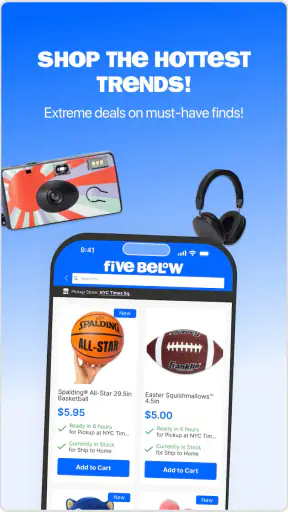
The main appeal is the combination of quick browsing, saved items, new-product discovery, and store pickup. I can swipe through products, keep interesting ones in a personal wishlist, and move from online discovery to a nearby collection option when that makes more sense than waiting for delivery. That combination gives the app a different rhythm from a standard supermarket or department-store app: it feels built for impulse-friendly shopping, but it still has useful tools for planning a visit.
How the current Five Below shopping experience feels
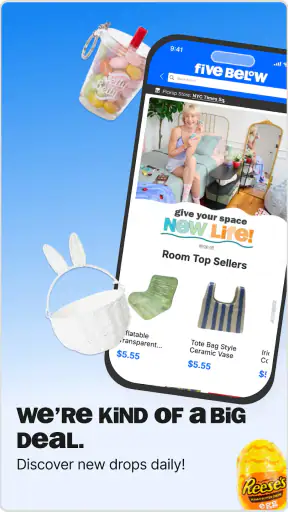
The app opens into a colorful retail environment that matches the kind of products Five Below sells. Instead of presenting a narrow catalog, it encourages exploration. I can move from one product idea to another quickly, which is useful when I am shopping for a birthday bag, refreshing a desk, or trying to find inexpensive items for a room. The experience is less about one carefully researched purchase and more about discovering several possibilities, comparing them, and deciding which ones are worth adding.
That browsing style is a strength, although it can also make the app feel busy. Product variety is part of Five Below’s identity, and the app reflects that variety rather than hiding it behind a minimalist layout. If I am in the mood to explore, that works well. If I need one exact item immediately, I have to be more deliberate with search, categories, and location-related options instead of simply swiping through the home feed.
I found the wishlist especially useful for controlling that impulse-shopping feeling. When I see several inexpensive items that look appealing, saving them first gives me a chance to return later rather than filling a cart immediately. It also creates a simple shortlist for a future store visit. This is one of the more practical ways to use the app: treat the wishlist as a shopping plan, not just a collection of things I might never buy.
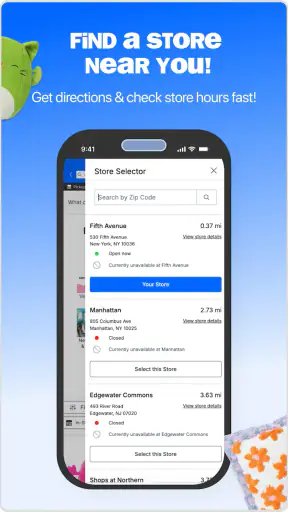
The store pickup option changes the value of the app for local shoppers. A normal retailer app may be good for delivery research, but Five Below’s low-priced products are often the kind of purchases I want quickly or alongside another errand. Pickup can make the app useful before leaving home: I can look for suitable items, decide whether the trip is worthwhile, and organize the purchase around a nearby store rather than wandering through every aisle.
There is an important trade-off here. Pickup is convenient when the item and location line up, but it does not remove the need to pay attention to store selection and availability during the shopping process. I would not assume that an item seen while browsing is automatically ready at the closest location. For a time-sensitive purchase, I would select the store early and confirm the pickup path before relying on it for a party, school project, or last-minute gift.
Who will get the most from it
This app makes the most sense for people who already shop at Five Below or live close enough to use its stores. Families can use it to assemble inexpensive activity supplies, small rewards, or party extras without visiting several different retailers. Students may find it handy for dorm-room accessories and desk items. It also suits anyone who enjoys browsing for affordable gifts but wants a way to save ideas before deciding.
I would also recommend it to shoppers who prefer a hybrid routine. I can browse at home, save a few candidates, and then use pickup or an in-store visit to finish the purchase. That is more efficient than arriving without a plan, especially when I am buying several unrelated things. The app is not only for people who want delivery; its real usefulness comes from connecting digital browsing with a physical store trip.
On the other hand, I would skip it if I need highly specialized products, detailed technical specifications, or a very predictable inventory. Five Below is focused on accessible, low-cost merchandise and changing discoveries. Someone searching for professional equipment, premium materials, or a product with extensive expert documentation will probably have a better experience with a specialist retailer. The app is also less compelling if there is no convenient Five Below location and I rarely make small, casual purchases.
What has changed and what the version tells me
The current version is identified as 2025.AW-1.0.3, which places this review in the context of an actively maintained shopping experience rather than an abandoned catalog app. I see that as a useful sign for existing users: the product is still being presented as a current way to discover new merchandise and organize purchases. The app itself has been available since December 23, 2015, so it has had time to move beyond being a simple digital storefront.
I would be careful, however, about treating a version number as proof that every part of the experience has been transformed. A version label confirms the current release identity, not a complete list of improvements. What I can judge directly is the present emphasis on swiping through products, saving favorites, browsing new arrivals, and using pickup. Those are the elements that shape the day-to-day experience now, regardless of how earlier releases were structured.
For someone who has used the app for years, the most meaningful evolution is likely the way discovery and store visits work together. The app is no longer something I would view only as a digital flyer. The wishlist gives browsing a memory, while pickup gives saved products a practical next step. That matters because Five Below purchases are often assembled from several small decisions rather than one large order.
Existing users should still approach updates with realistic expectations. A newer release can improve navigation or maintain compatibility without changing the retailer’s basic character. This remains a fast-moving, variety-led shopping app. If I liked it because it made low-cost browsing easy, the current direction supports that habit. If I wanted a completely different kind of shopping tool, a version update would not necessarily solve that mismatch.
A realistic way I would use it during a busy week
Imagine I need a few items for a child’s birthday gathering after work. I would start by browsing for small gifts, decorations, games, or useful extras and save possible choices instead of buying the first things I see. That creates a short list while I still have time to think about age, interests, and how many guests I need to accommodate. I could then check the list again, remove the weaker options, and choose a nearby store for pickup if that route is offered for the items I want.
The useful detail is that the wishlist separates discovery from commitment. Without that pause, the app’s abundance can encourage me to buy several attractive but unnecessary items. With it, I can use the app as a filter: first gather ideas, then compare them against the actual occasion, then purchase only what fits. This workflow is more valuable than simply scrolling because it turns the app’s playful presentation into a practical planning tool.
I would use a similar approach for a dorm refresh. Rather than searching for one complete style, I could save a few storage pieces, desk accessories, lighting-related items, or decorative choices and review them together. The limitation is that low-cost products may not form a perfectly coordinated collection, so I would use the wishlist to compare the overall look and usefulness before placing an order or visiting the store.
Where the experience still has friction
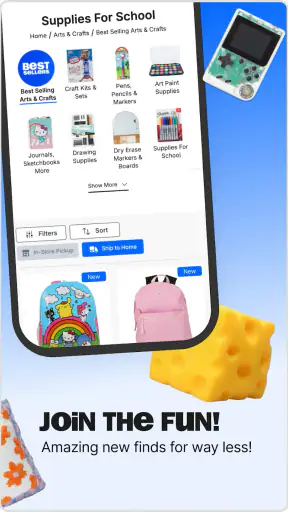
The biggest limitation is the same feature that makes the app entertaining: there is a lot to browse. A discovery-first layout can be excellent for finding an unexpected gift, but it is not always the fastest route to a precise purchase. I would use search or category navigation when I know what I need, and reserve the swipe-style browsing for open-ended shopping. Mixing those two habits keeps the app from becoming a time sink.
Another point to keep in mind is that the app cannot make a changing retail assortment feel completely stable. New drops and seasonal products are part of the appeal, but they also mean that a saved idea may not remain equally easy to find later. If an item is important, I would not treat the wishlist as a guarantee that it will be available indefinitely. I would use it as a reminder and make the purchase decision while the product is still relevant.
Pickup also deserves a measured assessment. It can save a trip through the aisles, but it is most useful when I am flexible about substitutions or when I have checked the exact store and product details. For a casual purchase, a little uncertainty is manageable. For a gift needed on a specific day, I would build in extra time and avoid waiting until the last moment. The app supports planning, but it does not remove the ordinary risks of local retail inventory.
The low-price focus creates another trade-off. Five Below is attractive when I want affordable variety, but the best choice is not always the cheapest-looking choice. I would compare materials, intended use, and how often the item will be handled. For a temporary party accessory, the value can be excellent. For something I expect to use heavily every day, a more specialized retailer may offer better durability or clearer product information.
How it compares with ordinary shopping alternatives
Compared with visiting a Five Below store without preparation, the app gives me a way to make the trip more intentional. I can gather ideas before arriving and use pickup when it fits. The physical store still has an advantage for shoppers who want to see colors, sizes, textures, or packaging in person. For some purchases, especially gifts and room accessories, that tactile check is part of the decision. I see the app and the store as complementary rather than competing choices.
Compared with a broad marketplace app, Five Below’s focus is narrower but more coherent. A large marketplace may offer more brands, more technical detail, and a wider range of quality levels. Five Below’s app is better when I want the retailer’s particular mix of playful, affordable finds in one place. I do not open it expecting endless premium alternatives; I open it when low-cost variety and the possibility of a quick store pickup matter more.
Compared with a general deal or coupon app, this experience feels more connected to actual merchandise discovery. A deal service may help me compare discounts across retailers, but it does not necessarily give me the same direct path from browsing to a Five Below wishlist and local collection option. The trade-off is that I am shopping within one retailer’s assortment instead of surveying the entire market.
My practical advice is to choose the tool according to the purchase. Use this app for inexpensive gifts, seasonal browsing, small room changes, and several-item errands. Use a specialist store when specifications, long-term durability, or a precise brand are more important than discovery. That distinction prevents disappointment and makes the app’s strengths much clearer.
Useful habits for getting better results
My first tip is to build the wishlist in stages. On the first pass, save anything that genuinely catches my attention. On the second pass, remove duplicates and items that do not suit the purpose. On the final pass, check whether the remaining products make sense together and whether pickup is practical. This three-step approach is particularly helpful when shopping for a group, because it reduces the chance of buying attractive extras that do not solve the actual need.
My second tip is to browse before I need the item, not only when I am already late. The app’s discovery style rewards patience, and a little lead time lets me compare ideas rather than accepting whatever happens to be visible first. That is especially useful for birthdays, dorm moves, classroom activities, and seasonal decorating, where a small amount of planning can make low-cost shopping feel much less random.
My third tip is to separate “fun to own” from “useful for this occasion.” Five Below is designed around tempting finds, so I would ask myself where the item will go, who will use it, and whether I would still want it without the excitement of the browsing moment. The wishlist makes that question easier because I can wait before spending. In my experience, this is the best defense against turning a cheap individual purchase into an unnecessarily large basket.
For pickup, I would choose the store before finalizing a time-sensitive plan and review the order around that location. If the app is being used for a quick errand, I would keep the list focused instead of combining every interesting discovery into one visit. That makes the process easier to manage and keeps the convenience of pickup from becoming another form of browsing overload.
What to watch as the app continues
The most important thing I would watch is how well the app balances discovery with control. New-product browsing is valuable, but returning users also need a clear way to find saved items, narrow a list, and move confidently toward pickup. The stronger that connection becomes, the more useful the app will be for planned shopping rather than only spontaneous scrolling.
I would also pay attention to how the current release serves both kinds of users: people who want to explore and people who arrive with a very specific need. Five Below’s personality depends on surprise, yet a shopping app still needs to respect a user’s time. The best future direction would preserve the playful catalog while making focused tasks feel just as straightforward.
For now, the app has a clear identity. It is a free shopping app with an average rating of 4.2 from around 27 thousand ratings, and it has passed the million-install mark, so it is not a niche experiment. Its Everyone age classification also fits the broad, family-friendly nature of the catalog. Those figures suggest a well-established audience, but my recommendation is based more on how the tools fit real shopping habits than on popularity alone.
My final recommendation is simple: use it as a discovery-and-planning tool, not as a replacement for careful product judgment. I like the way the wishlist slows down impulse decisions, and I find pickup genuinely useful when a nearby store and a clear shopping list are involved. I would choose another retailer for specialized or durability-critical purchases, but for gifts, small projects, room accessories, and affordable surprises, Five Below: Shop Fun Finds is an easy app to keep available. It is at its best when I let the browsing be fun while using the saved list and store choice to keep the final purchase sensible.


